
 Support
Landlords and Property Managers Receiving Rent Paid Directly by the Government: RentPackage Splits Every Period into a Tenant Bill and a Government Bill
Contents
- Why use RentPackage for rent paid directly by the government
- When to fill it in
- Set it up when creating the lease
- What the two bills look like each period
- One government transfer for several units: mark them as received at once
- Property management: the management fee waits until both bills are received
- Subsidy amount changed, added or cancelled mid-lease
- Renewal
- FAQ
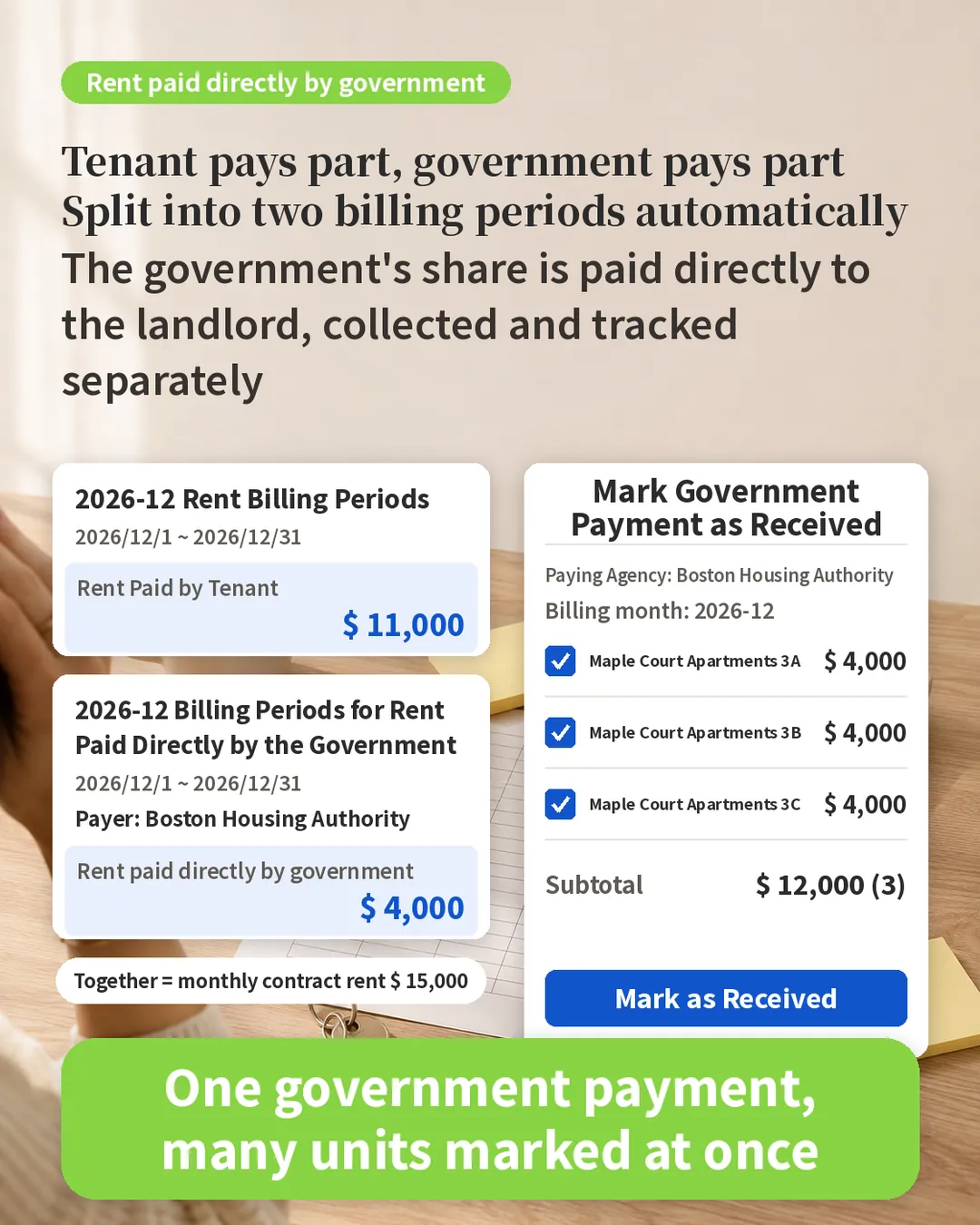
Enter once in the lease how much the government pays each month, and the system creates a tenant bill and a government bill every period. When the government pays for several units in one transfer, tick them and mark them all as received at once.
Why use RentPackage for rent paid directly by the government
For some tenants, part of the rent is paid by the government directly to the landlord or property manager, and the tenant pays only the rest. In a spreadsheet, every period's rent has to be split into two entries: the tenant's entry also carries utilities and management fees, while the government's entry is rent only. Payment notifications must not send the government's part to the tenant, and when chasing late rent you have to remember the tenant only owes their own share. A government transfer often covers several units at once, so at month end you go through the payment advice and look up, unit by unit, which periods it covers and whether the amounts match. With more tenants, splitting and reconciling becomes work you redo every month.
- Two bills split automatically (we calculate)
When you create the lease, enter how much the government pays each month. Every period the system creates two bills: the tenant pays the rent minus the subsidy, plus utilities and other items; the government pays rent only. The two add up exactly to the period's rent, and partial periods are split pro rata. - The government's bill is never sent to the tenant (we follow up)
Payment notifications, overdue reminders and receipts are sent only for the tenant's bill. Tenants do not see the government's bill in the Tenant Portal, and it is never treated as their debt. Overdue and upcoming rent on the properties page also count only the tenant's bill, so your to-do list is the money you really need to collect from tenants. - Reconcile a government transfer in one go (we record)
When one government transfer covers several units, [Mark Government Payment as Received] lists the unpaid government bills by paying agency and month. Tick the bills included in the transfer and mark them all as received at once; anything not yet received stays on the list. - Management fees are never deducted too early
The system deducts the management fee from the owner trust account only after both the tenant's and the government's bills are received, not as soon as the tenant's part arrives.
When to fill it in
Look at who sends you the money: fill in only the part the government pays directly to you (the person collecting the rent), with the tenant paying the rest. If the subsidy goes to the tenant and the tenant pays you the full rent, record it as a normal lease and leave this empty.
Common examples in different countries:
- Taiwan: disadvantaged households in the social housing sublease and management program (社會住宅包租代管) pay only the rent after the subsidy, and the operator claims the difference from the government.
- United States: Section 8 (Housing Choice Voucher), where the housing authority pays its share of the rent directly to the landlord.
- United Kingdom: the housing element of Universal Credit is usually paid to the tenant; fill this in only when it has been arranged to be paid directly to the landlord.
- Germany: fill it in when the Jobcenter pays the rent directly to the landlord.
Both situations exist within the same country, so this feature is available to companies in every country. Decide for each lease based on how it is actually paid.
Set it up when creating the lease
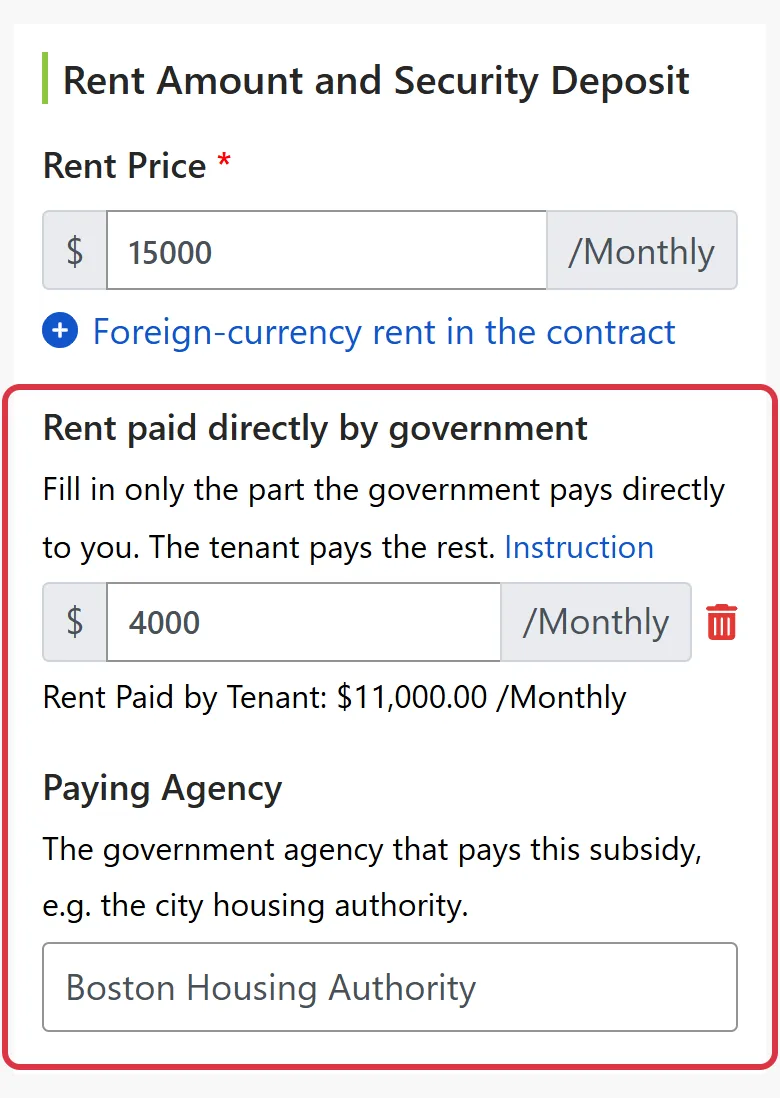
- Create a new tenant lease and fill in [Rent Price].
- Under [Rent Price], press [⊕ Rent paid directly by government].
- Enter how much the government pays each month. The amount must be greater than 0 and less than the rent. For quarterly or half-yearly payment, still enter the monthly amount.
- Fill in [Paying Agency], the government agency that pays this money, e.g. the city housing authority.
- [Rent Paid by Tenant] (the rent minus the government's part) appears below. Check the amount.
- Open the preview for generating tenant billing periods. Each period lists two bills: the rent billing period (paid by the tenant) and the billing period for rent paid directly by the government (paid by the government).
Note:
- Ticking as received in the preview only marks the tenant's bill. Mark the government's bill as received when the transfer arrives.
- For now, rent paid directly by the government and foreign-currency lease rent cannot be used on the same lease.
What the two bills look like each period
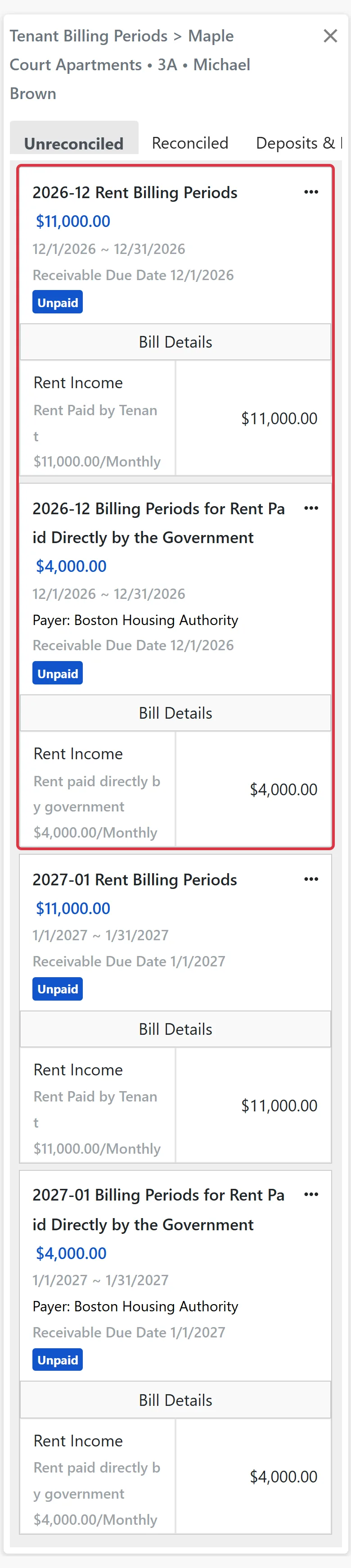
Once the lease is saved, every period has two bills with the same period number, start and end dates, and due date:
- Rent billing period: paid by the tenant. The rent minus the government's part, plus utilities, management fees and other items.
- Billing period for rent paid directly by the government: paid by the government. Rent only, with an extra line under the name, "Payer: {paying agency}", so you can see at a glance whom to collect from.
How the two bills differ:
| Rent billing period (tenant) | Billing period for rent paid directly by the government | |
|---|---|---|
| Payment notifications, overdue reminders, receipts | Sent to the tenant | Not sent to the tenant |
| Tenant Portal | Visible | Not visible |
| Online rent payment | Yes | No |
| Pay with prepayment | Yes | No, choose the actual payment method (e.g. bank transfer) |
| Overdue and upcoming rent on the properties page | Counted | Not counted |
Rent reminder emails to employees still list the government's bill, so nothing is missed. For month-to-month leases, once the tenant's period is paid, the next period of both bills is created together.
One government transfer for several units: mark them as received at once
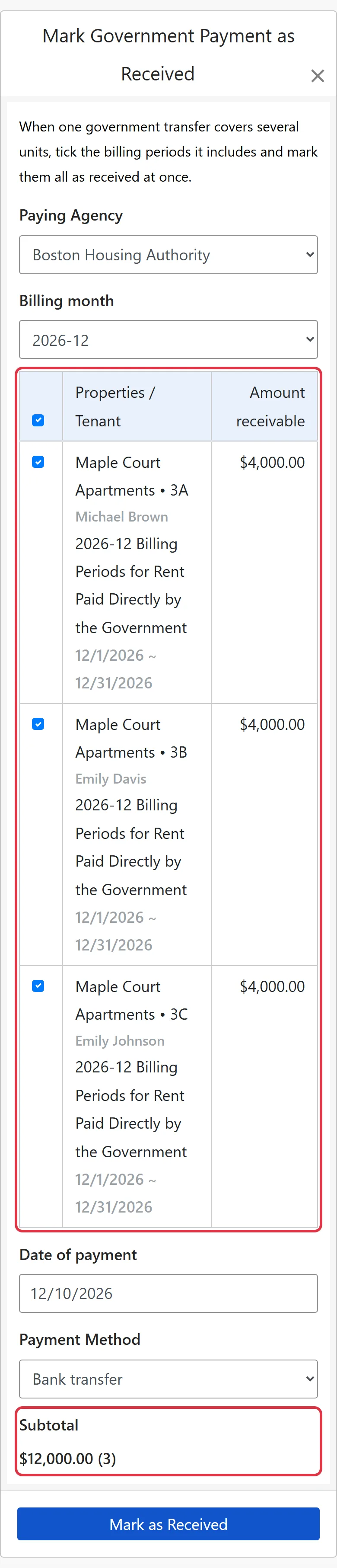
- Go to [Accounting] > [Property accounting] and press [Mark Government Payment as Received] in the top right (it appears only when your company has a lease with rent paid directly by the government).
- Choose [Paying Agency] and [Billing month]. The system lists the unpaid billing periods for rent paid directly by the government.
- Using the government's payment advice, tick the bills included in this transfer. The total amount and count appear below so you can check them against the transfer.
- Fill in [Date of payment] and [Payment Method], then press [Mark as Received]. All ticked bills are marked as received at once.
- Employees see only the properties they watch.
- If only one unit was paid, you can also mark that bill as received directly, just like any other bill.
Property management: the management fee waits until both bills are received
For managed properties with a management fee, the system deducts the fee from the owner trust account only after both the tenant's and the government's bills are received.
- Tenant's bill received first: the mark-as-received window says the government's amount has not been received yet and the management fee will be deducted from the owner trust account only when the government's payment is marked as received.
- Government's bill received later: when you mark it as received, the system deducts the management fee automatically. Nothing else to do.
Money received on the government's bill goes into the trust account just like the tenant's, and it is listed in the owner distribution together with the payer.
Subsidy amount changed, added or cancelled mid-lease
When the government changes the subsidy amount, or a tenant is approved for or loses the subsidy mid-lease:
- Go to [Contract Management] > More Actions > [View/Edit Contract].
- In [Rental Terms], change the rent, the rent paid directly by the government and the paying agency. To cancel the subsidy, remove it.
- Choose [Set a new effective billing period] and press [Save].
The system deletes both the tenant's and the government's bills after the effective period and recreates them under the new terms.
- Periods where the government's bill has been paid, is being processed or is awaiting reconciliation cannot be changed. Set [Set a new effective billing period] to a period after them.
- In the recurring billing periods below, the rent billing group cannot be changed on its own. To change the rent, use [Rental Terms] above.
Renewal
On renewal, the rent paid directly by the government is carried over from the previous lease. You can change the amount or the paying agency, or remove it; if the previous lease did not have it, you can add it when renewing. The new lease also creates a tenant bill and a government bill every period.
FAQ
What if the government pays less this month?
On that billing period for rent paid directly by the government, press [Mark as Received] and enter the amount actually received. The difference becomes a supplementary billing period whose name shows it belongs to the government; mark it as received when the rest arrives.
The subsidy is paid by the government to the tenant. Do I fill this in?
No. The tenant pays you the full rent, so record it as a normal lease. Fill in only the part the government pays directly to you.
Will the tenant see how much the government pays?
The government's bill does not appear in the Tenant Portal, and payment notifications and receipts are sent only for the tenant's own bill.
Can I import a bank statement to mark them as received at once?
No. Bank statement import only matches the tenant's bills. For government transfers, use [Mark Government Payment as Received].
Summary: no more splitting rent and matching transfers unit by unit every month
If you keep using spreadsheets, next month you will again split every period's rent into two entries, take care not to send the government's part to the tenant, and match each government transfer unit by unit. Once the lease has its rent paid directly by the government, both bills are created every period, the tenant only receives their own bill, and a government transfer is reconciled with a few ticks.
Start with one subsidized tenant: add rent paid directly by the government in their lease's [Rental Terms], and look at the two bills the system creates for the next period.
Try RentPackage for freeRelated articles
- RentPackage for Taiwan Social Housing Sublease and Management: Government Lease Templates Filled In Automatically, Monthly Rent Receipts Printed in One Go:Taiwan social housing lease templates, social housing match numbers, and monthly rent receipts printed in one go.
- RentPackage Management Fees: Agencies Bill Owners Automatically Every Period and Deduct the Fee When Rent Comes In:How to set up the management fee for managed properties and when it is deducted from the owner trust account.
- RentPackage Partial Payments: When a Tenant Pays Only Part of the Rent, Landlords and Property Managers Track the Balance Automatically:How a supplementary billing period is created when you receive less than the bill.