📄 Interface Environment Overview: Understand the main screen in five minutes, knowing where to handle everything. 📄 How to use Property Overview in RentPackage for a quick grasp of the full building status. 📄 RentPackage Add Managed Property: Complete property setup, owner details, opening balance, and online signing in one go. 📄 RentPackage Add Lease: Set the lease term, deposit and utilities in one go, and billing periods are generated automatically. 📄 RentPackage Tenant Billing Periods: Payment Reconciliation, Partial Payments, Meter Reading, and Deposits. All routine rent collection in one place. 📄 RentPackage Owner Distribution: Property Managers Pay Owners After Deducting Fees, With Security Deposits Kept Separate 📄 Profit Calculation: See exactly how much the owner and your company each earn 📄 How to Quickly Estimate Next Month and Year’s Rental Income with Estimated Receipts in RentPackage 📄 Compliance assistance and responsibility statement 📄 Contract templates overview 📄 Sublandlord feature guide 📄 Partial payment feature guide 📄 Prepayment feature guide 📄 Rent billing periods feature guide 📄 Start billing feature guide 📄 Recurring billing periods feature guide 📄 Booking feature overview 📄 E-contract setup guide 📄 Management fee setup guide for property management companies 📄 Why are deposits and prepayments liability accounts in accounting? 📄 RentPackage General Edition overview 📄 RentPackage Commission Split: Calculate Commissions, Tax, and Agent Bonuses in One Place After Every Rental Deal 📄 Why do all landlords and agents need tenant management automation software? 📄 How to handle exchange rates for Euro-denominated rent? 📄 US Tax Filing - Schedule E Instructions 📄 UK Tax Filing - SA105 Instructions 📄 How to activate Stripe online rent collection in RentPackage 📄 How to use Calendar to schedule tenant notifications: Power outage example 📄 How to set the agency logo to display your brand on Email notifications and contract PDFs 📄 What is Rent Insurance? Compensation for unpaid rent; policy managed with the lease 📄 Anlage V Germany Rental Income Tax Report User Guide 📄 T776 Canada Rental Income Tax Report User Guide 📄 PIT-28 Polish Rental Income Tax Report User Guide 📄 How to Generate an Australian Rental Schedule in RentPackage, Auto-Match Income and Expenses to ATO Categories 📄 How to Use the Romanian Rental Income Tax Report (Declarația Unică 212) in RentPackage 📄 How to generate Hungarian SZJA rental income report data in RentPackage and compile eSZJA entry numbers with one click. 📄 RentPackage Income Statement: Auto-calculates income per property, per owner 📄 RentPackage Balance Sheet: How much of the bank balance belongs to tenants? View deposits and prepayments at a glance. 📄 RentPackage Cash Flow Statement: How much did actual cash increase during the rent period? 📄 How to generate a General Ledger in RentPackage, automatically summarizing rent and property accounts 📄 RentPackage Enter manual journal entries: repairs, insurance, depreciation. Record transactions outside of the billing period. 📄 Custom rental notifications: rent reminders, lease expiration, sent to the right person at the right time 📄 RentPackage LINE Rent Payment Notifications: Tenant Setup Guide and Automatic Rent Reminders 📄 RentPackage Employee Management: Team Collaboration for Agency and Property Management Teams, Split by Property and Role 📄 Why can property management software dramatically save time and cost?

Recurring utilities billing group guide

Recurring utilities billing group quick tour

Illustration of water and electricity bills generated on a recurring cycle
What is a recurring utilities billing group?

A recurring utilities billing group is a configuration that auto-generates billing periods and charges. You can set the cycle, calculation method, and applicable leases for items like rent and utilities. The system will create invoices by cycle, reducing manual setup.

How do I create a recurring utilities billing group?

When you Add Lease, the Recurring Utilities Billing Group screen appears. Click + Add Recurring Utilities Billing Group to start.
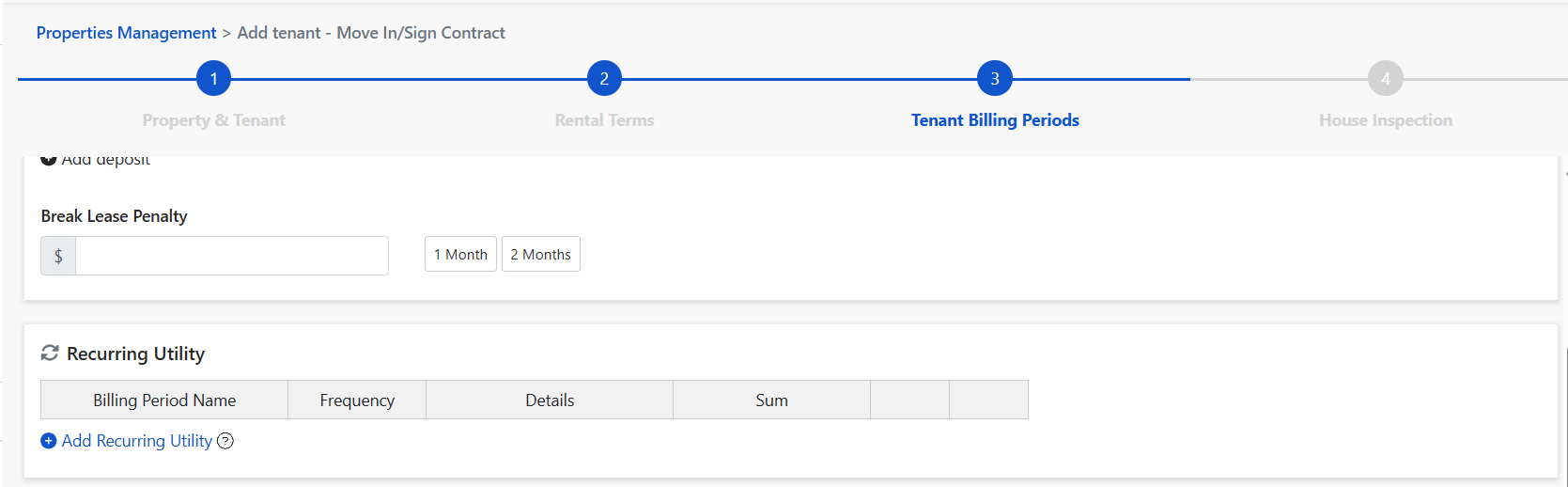
Recurring Utility section with the Add link when signing a lease
Three types of recurring charges
1️⃣ Metered

For electricity, water, gas, etc., where each period requires entering readings.

  • Set a unit rate (e.g., $5 per unit, $5.5 per unit)
  • Enter the opening and current readings each period
  • The system calculates the charge automatically
If summer/winter rates differ, adjust that period’s unit rate after the invoice is created.
2️⃣ Fixed charges

For fixed-amount, recurring charges such as internet, elevator, and water.

  • Set the amount and cycle directly
  • Bills for a fixed amount will be generated on a fixed cycle
3️⃣ Manual entry

For items where you enter the amount from external bills (e.g., water company, gas company).

  • Enter the actual amount after the period is generated
Add recurring bills to a lease

When creating a lease:

  • You can select an existing electricity setting
  • Or choose [+ Add] from the dropdown
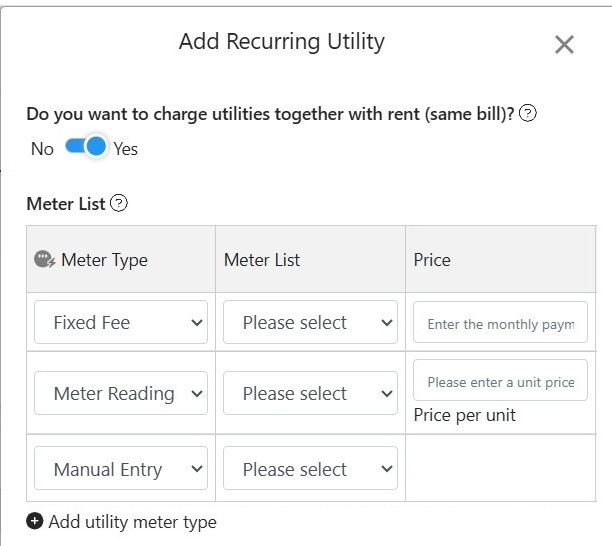
Add Recurring Utility window with three meter types
How do I edit an existing recurring billing period?

After the lease is created, to edit billing periods go to:

  • Unit > Tenant Billing Periods > Recurring tab > [⋯] > [Edit]
  • Unit > View / Edit Lease > Recurring tab > [⋯] > [Edit]
How do I add custom income categories?

You can add income categories for utility types as needed. Path:

  • Accounting > Chart of Accounts > Income tab
  • Click [+ Add], then choose Metered, Manual entry, or Flat fee
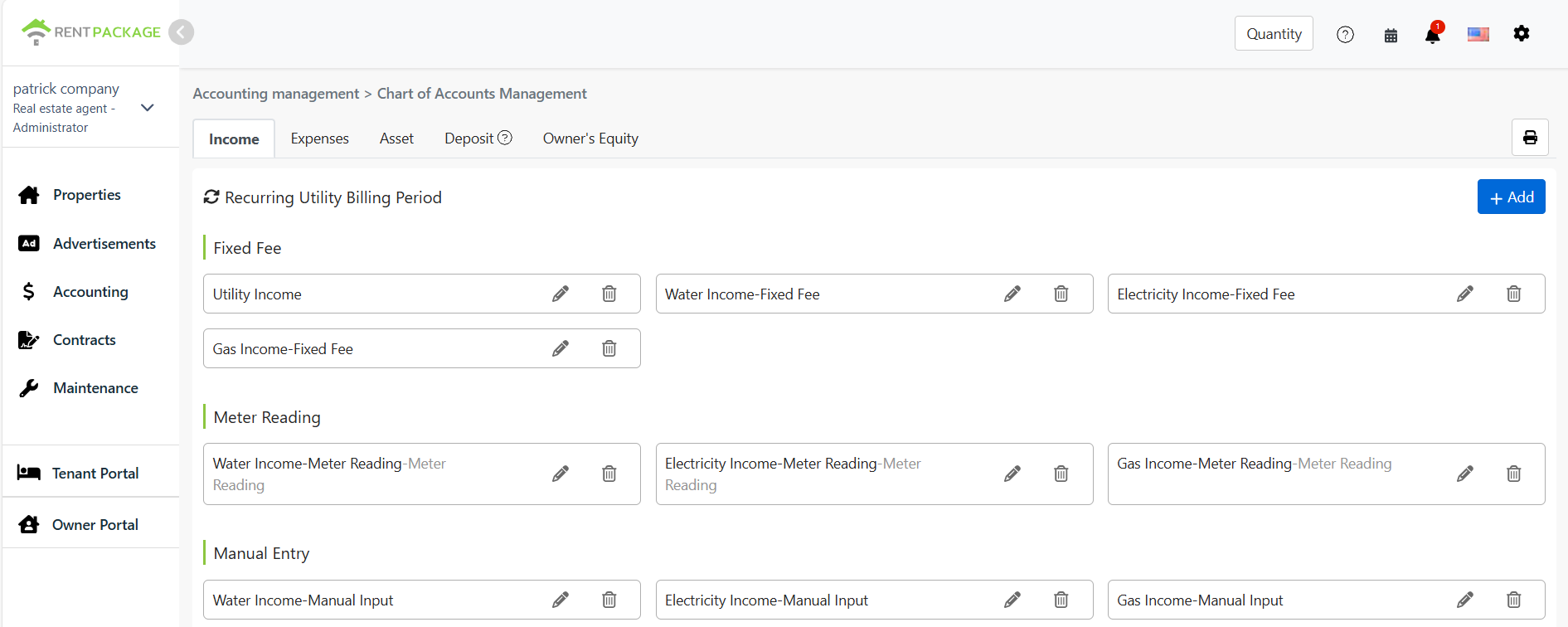
Recurring utility income accounts in Chart of Accounts Management
Feature benefits summary
  • Bills auto-generate on a recurring schedule, saving setup time
  • Flexible unit rates and flat fees
  • Works with leases and billing periods to centralize each tenant’s receivables